iPad screen coming loose or bulging: watch out for your battery

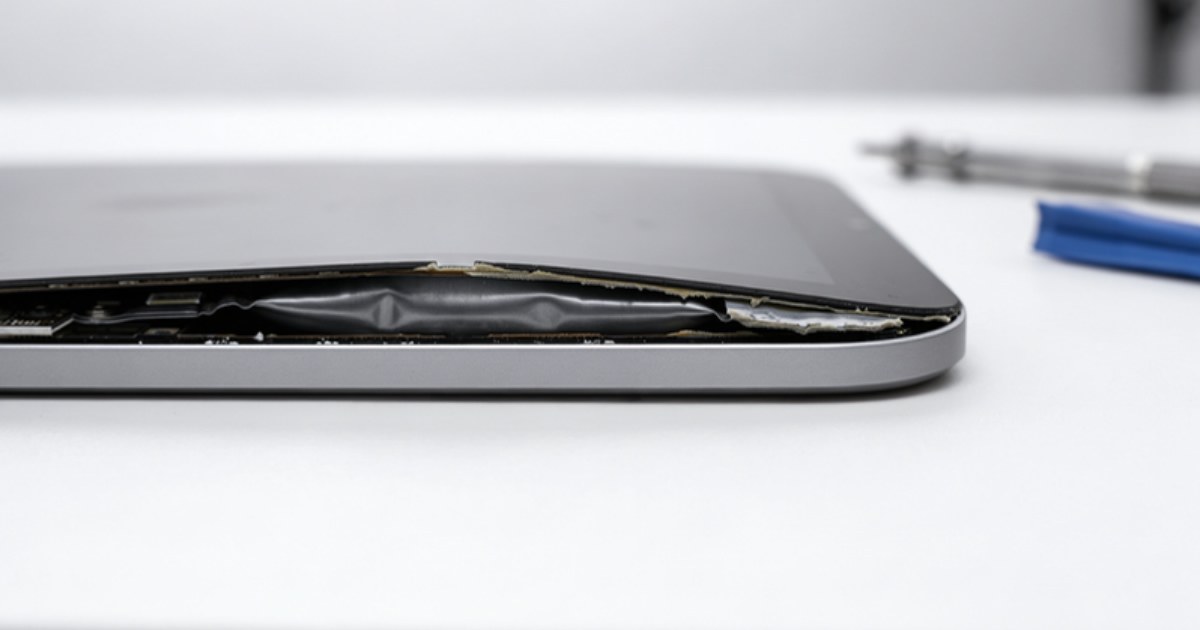
You suddenly see a gap between the screen and the casing of your iPad. Or the screen wobbles a little when you press on it. That is usually not glue coming loose, but a battery that is swelling and pushing the screen outwards. That is something to take seriously.
Stop charging, don’t press on the screen and keep your iPad somewhere cool. A swollen battery can get hot and, in the worst case, catch fire. Have it replaced as soon as possible. Because the screen has already been pushed up, the screen is often replaced at the same time.
How to recognise a swollen battery
- A gap between the screen and the casing, often on one side.
- The screen wobbles or creaks when you press on it.
- Lighter patches or pressure marks in the image.
- Touch responds strangely or the iPad does things by itself.
- The iPad no longer lies flat on the table.
What to do now
- Stop chargingUnplug the cable and don’t charge it any more.
- Don’t pressDon’t push the screen back down. You could damage the battery.
- Cool and clearPut it on a hard, cool surface, not on a bed or sofa.
- Back up if you still canIf the battery still has charge, save your photos.
- Come inPreferably soon. Carry it in a sturdy bag, without any pressure on it.
Why does a battery swell?
A lithium battery produces a small amount of gas as it wears. With an old battery, a lot of heat or an iPad that has been on the charger for years, this increases. The battery then expands. There is little room in an iPad, so the screen is the first thing to come up.
In an iPad, the battery sits behind the screen. The screen has to come off for the replacement. If the screen is already warped or cracked by the pressure, we replace it at the same time. We always discuss that with you beforehand.
Replace your iPad battery
Choose your iPad and then Battery. We’ll first look together at whether the screen needs to be replaced too.
- Open 7 days a week
- Warranty of up to 12 months
- Ready while you wait
Frequently asked questions
Is a swollen iPad battery dangerous?
Yes, it can get hot and, in the worst case, catch fire. Don’t use it or charge it any more.
Can I just glue the screen back?
No. The problem is underneath. The battery has to come out, otherwise the screen will come up again.
Does the screen always have to be replaced too?
Not always. If the screen is undamaged, we try to reuse it. It can still break when we open it. We discuss that with you beforehand.
How do I stop the battery from swelling?
Don’t leave your iPad on the charger all the time and keep it out of the sun and away from the radiator.
Read also
Daan has been a technician at Fixers for three years and is certified for Apple (Atlas) and Samsung (GSPN). He works at Fixers Leiden and contributes to the knowledge base, so you can often solve a problem yourself first.