Swollen MacBook battery: spot the signs in time

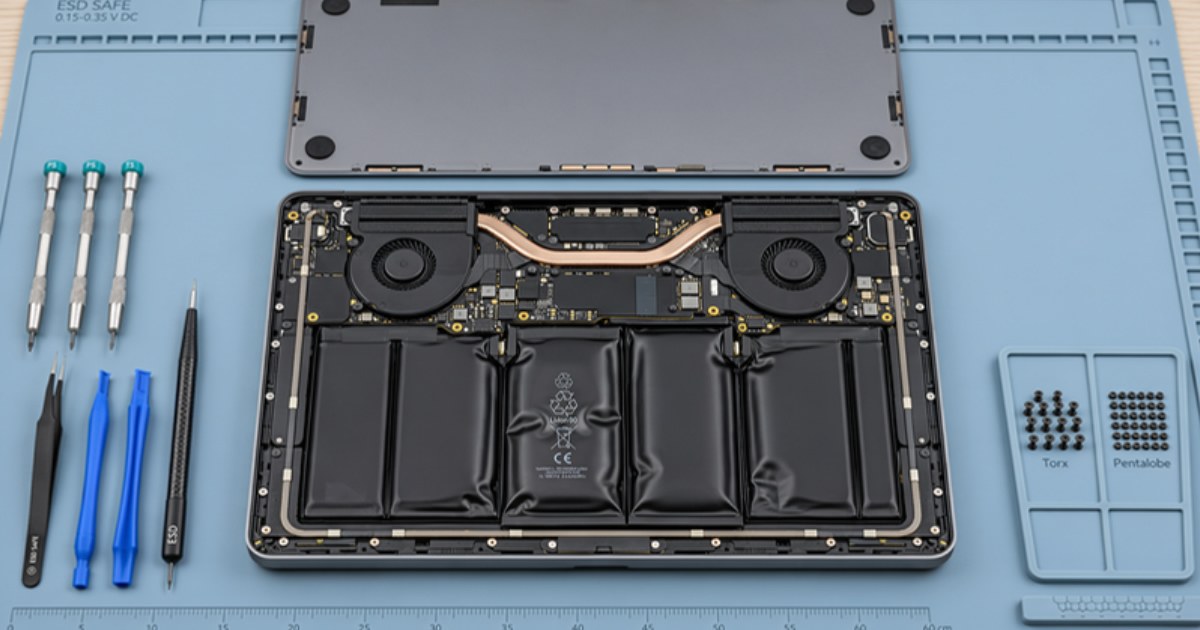
Suddenly the trackpad on your MacBook clicks stiffly, or your laptop wobbles on the table. Small thing, you think. But often it’s a battery that is swelling and pushing against the trackpad and the bottom case from the inside. That’s not something to ignore.
Stop charging, don’t press on anything and have your MacBook checked as soon as possible. A swollen battery can get hot and, in the worst case, catch fire. If you still can, back up your files first. The battery needs to be replaced.
The signs
- The trackpad doesn’t click or clicks stiffly, or sticks out slightly.
- The underside bulges and your MacBook wobbles on a flat table.
- The screen no longer closes completely.
- The keyboard or the casing sits slightly raised.
- The battery settings show Service Recommended.
What to do now
- Unplug the chargerAnd don’t charge it again.
- Make a back-upWith Time Machine, or by copying files to iCloud or an external drive.
- Turn it offAnd put it on a hard, cool surface.
- Don’t press on itDon’t try to push the trackpad or the underside back down.
- Have it checkedTransport it without pressure, so not at the bottom of a full bag.
Why does this happen?
As a lithium battery wears, it produces a little gas. This happens faster with old batteries, a lot of heat, or a MacBook that sits on the charger at 100% for years. The cells expand and push against anything in their way. In a MacBook, that is often the trackpad first.
Replace a swollen battery
Choose your MacBook, then Battery. Preferably come in soon.
- Open 7 days a week
- Warranty of up to 12 months
- Ready while you wait
Frequently asked questions
Is a swollen MacBook battery dangerous?
Yes. It can get hot and, in the worst case, catch fire. Don’t use it on the charger any more.
Does the trackpad need replacing too?
Usually not. Once the new battery is in, the trackpad often works normally again.
Can I replace the battery myself?
We advise against it. A swollen battery can catch fire if it gets damaged.
How do I prevent it?
Keep Optimised Battery Charging switched on and keep your MacBook cool.
Read also
Daan has been a technician at Fixers for three years and is certified for Apple (Atlas) and Samsung (GSPN). He works at Fixers Leiden and contributes to the knowledge base, so that you can often solve a problem yourself first.