Stains on your MacBook screen that won’t go away: what’s going on

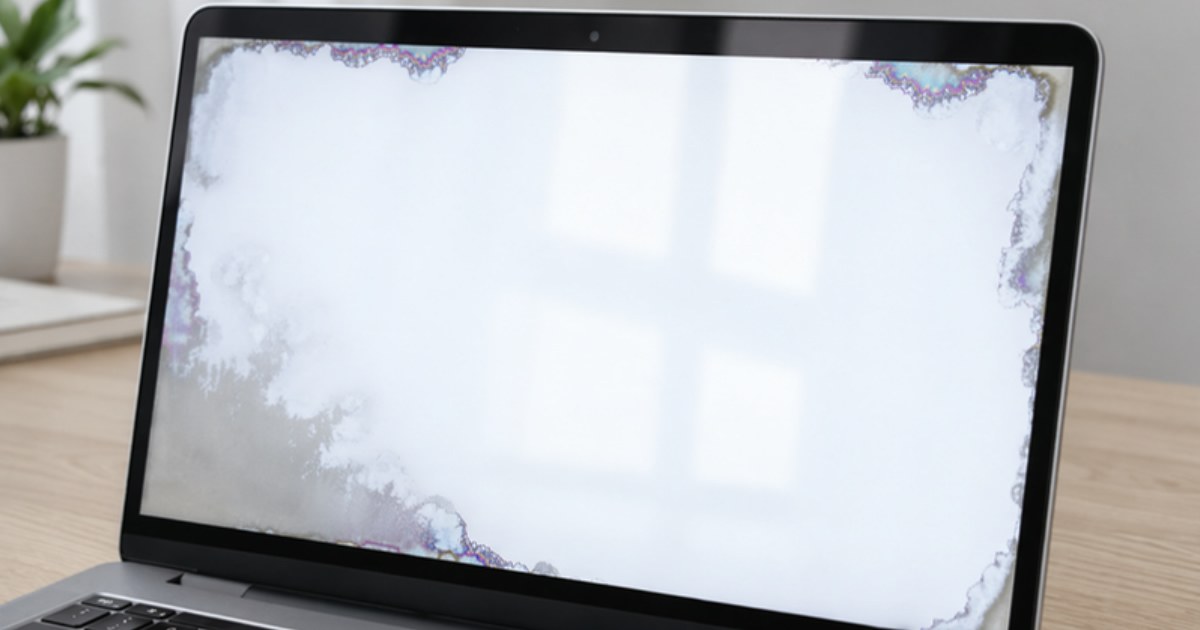
You can see stains on your MacBook screen, especially when the screen is black. Cleaning doesn’t help, or even makes it worse. There are three common causes. You can fix two of them yourself, but not the third.
You can remove greasy stains and prints from the keyboard with a slightly damp microfibre cloth. If the stains look like dissolved patches in a layer, the anti-reflective coating is peeling off. You see this mainly on older MacBooks. You can’t polish that away: the screen needs to be replaced.
Which stains do you have?
| What you see | Cause |
|---|---|
| Small rectangles in a row | Prints from the keys. Your keyboard touches the screen when you close it. |
| Greasy smears | Fingers, skin oils or cleaning product. |
| Stains that look like dissolved patches | A peeling anti-reflective coating. |
| Light or dark patches in the image itself | Damage to the screen, for example from pressure. |
How to clean the screen properly
- Switch your MacBook offAnd unplug the charger.
- Slightly dampen a microfibre clothWith water. Never spray anything directly onto the screen.
- Wipe without pressureGentle movements, no scrubbing.
- Don’t use glass cleanerHarsh products damage the coating.
If your MacBook has a nano-texture display, use only the polishing cloth from Apple.
Is the coating peeling?
With a peeling coating, you see stains that keep getting bigger, often first at the edges or where the keys touch the screen. Cleaning makes it worse, because you remove more of the layer. You can’t repair this. If you want a flawless display, the screen needs to be replaced.
Tip to prevent key prints: don’t put a thick cloth between the keyboard and the screen. The screen then won’t close properly and the pressure actually gets greater. Just keep the keyboard clean.
Replace your MacBook screen
Choose your MacBook and then Screen. We’ll first check whether it’s dirt or the coating.
- Open 7 days a week
- Warranty of up to 12 months
- Ready while you wait
Frequently asked questions
Can I remove key prints from my screen?
Usually you can, with a slightly damp microfibre cloth. If that doesn’t work, the coating may be damaged.
Can I use cleaning alcohol on my MacBook screen?
Preferably not on the screen. Use water on a microfibre cloth.
Does a peeling coating get worse?
Yes, especially if you keep polishing it.
Does the whole screen need replacing because of the coating?
Yes. The coating is attached to the screen and can’t be replaced separately.
Also read
Daan has been a technician at Fixers for three years and is certified for Apple (Atlas) and Samsung (GSPN). He works at Fixers Leiden and contributes to the knowledge base, so that you can often solve a problem yourself first.