Green or pink line on your Samsung screen: cause and fix

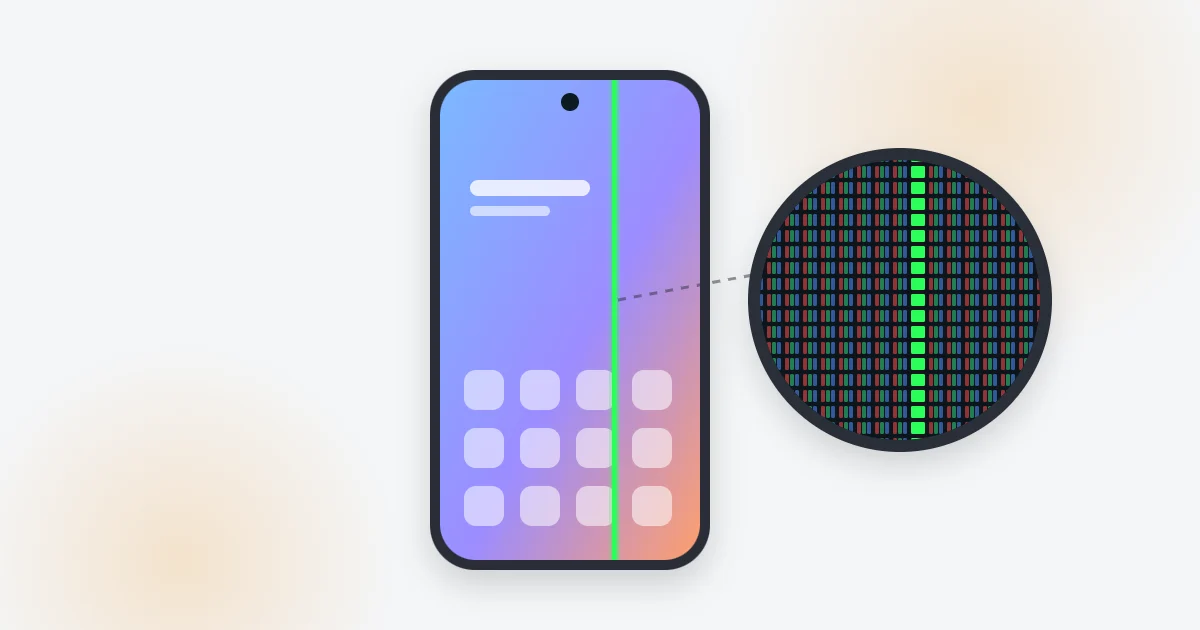
Suddenly there’s a thin green line across your screen, from top to bottom. On some people’s phones it’s pink, purple or white. It doesn’t go away when you restart and it runs across everything: your apps, your photos, your home screen. What is it, and can you do anything about it yourself?
A green or pink line on a Galaxy screen is almost always a fault in the screen itself. An update, restart or reset usually won’t remove it. A screenshot tells you within a minute whether the screen is the cause. If it is, a new screen is the only real fix.
Why does a Samsung screen get a line?
Most Galaxy phones have an AMOLED screen. In it, every pixel produces its own light. Along the edge of the screen there are wafer-thin connections between the panel and the chip that drives it. If one of those connections breaks, a whole row of pixels gets the wrong signal. You see that as a straight line in a single colour.
What breaks that connection varies:
- a drop or pressure on the screen, even if you can’t see a crack
- heat, for example in the sun or while charging under your pillow
- moisture slowly seeping in, see also our article on water damage
- normal wear after a few years
Many people see the line for the first time after a software update. Samsung has never confirmed that an update is the cause. Why it happens right after an update is not known.
Which models does it happen on?
Online it’s reported most often on the Galaxy S20 and S21 series, with the S21 Ultra and S21 FE as well-known examples. But it can happen on any AMOLED screen, including the A series and newer S models.
In 2024 Samsung offered a free screen replacement in India for a number of models with this problem. As far as we know, there has never been such a scheme in the Netherlands.
Test it yourself in a minute
- Take a screenshotPress the side button and volume down button at the same time.
- Look at the screenshot on another screenSend it to yourself and open it on a computer or another phone. If the line isn’t on it, the problem is in your screen. If it is on it, it’s software, and then an update or reset might help.
- Restart your phoneSwitch it back on via the power menu.
- Try Safe modeOpen the power menu, touch and hold Power off and tap Safe mode. Your phone then starts without your own apps. Is the line still there? Then it isn’t caused by an app.
- Update your softwareGo to Settings > Software update. An update won’t repair a broken screen, but this way you rule out software.
- Make a backup straight awayDo this via Samsung Cloud, Google or Smart Switch on your computer. A screen with a line can suddenly fail completely. Then you can no longer use your phone.
What doesn’t help?
- A factory reset. You lose your data and the line stays.
- Apps that promise to repair pixels. Those are meant for a stuck pixel, not a broken connection.
- Pressing or tapping on the screen. That’s more likely to make it worse.
- Waiting it out. The line rarely goes away on its own. More lines often appear.
A new Samsung screen at Fixers
For a green line we replace the whole screen. On many Galaxy models the original Samsung screen comes as a whole with the frame. Then everything fits tightly again, just as it did when it left the factory. You choose the quality yourself:
- Original. A new screen from Samsung itself. Colours, brightness and the in-screen fingerprint scanner work the way you’re used to.
- Refurbished. Good quality for less money.
- Budget. The cheapest option. Colours and brightness may differ slightly and the in-screen fingerprint scanner sometimes works less well.
If the screen is in stock, your phone is often ready while you wait. You get up to 12 months’ warranty, and Fixers is certified by Samsung.
Samsung screen replacement
Choose your Galaxy model and see the price per quality straight away. You can also walk in without an appointment.
- Open 7 days a week
- Warranty up to 12 months
- 8 stores and 8 Repairbars
Frequently asked questions
Does a green line go away on its own?
Almost never. Very occasionally it disappears for a while and comes back later. Assume it’s here to stay.
Can an update cause the line?
Samsung has never confirmed this. Many people do see the line for the first time after an update. If the line isn’t on a screenshot, the problem is in the screen and an update won’t fix it.
Is a pink, purple or white line the same thing?
Usually, yes. The colour depends on which pixels aren’t getting a proper signal. The fix is the same: a new screen.
Can I just carry on using my phone with a line?
As long as the rest of your screen works, you can. Do make a backup though, because it can suddenly get worse.
Will I lose my data with a new screen?
No, when the screen is replaced your data stays on your phone. A backup is still always a good idea.
How much does a new Samsung screen cost?
That depends on your model and the quality you choose. In our booking tool you can see the price per model straight away.
Also read
Daan has been a technician at Fixers for three years and is certified for Apple (Atlas) and Samsung (GSPN). He works at Fixers Leiden and helps write the knowledge base, so that you can often solve a problem yourself first.