‘Liquid Detected’ alert on your iPhone: what now?

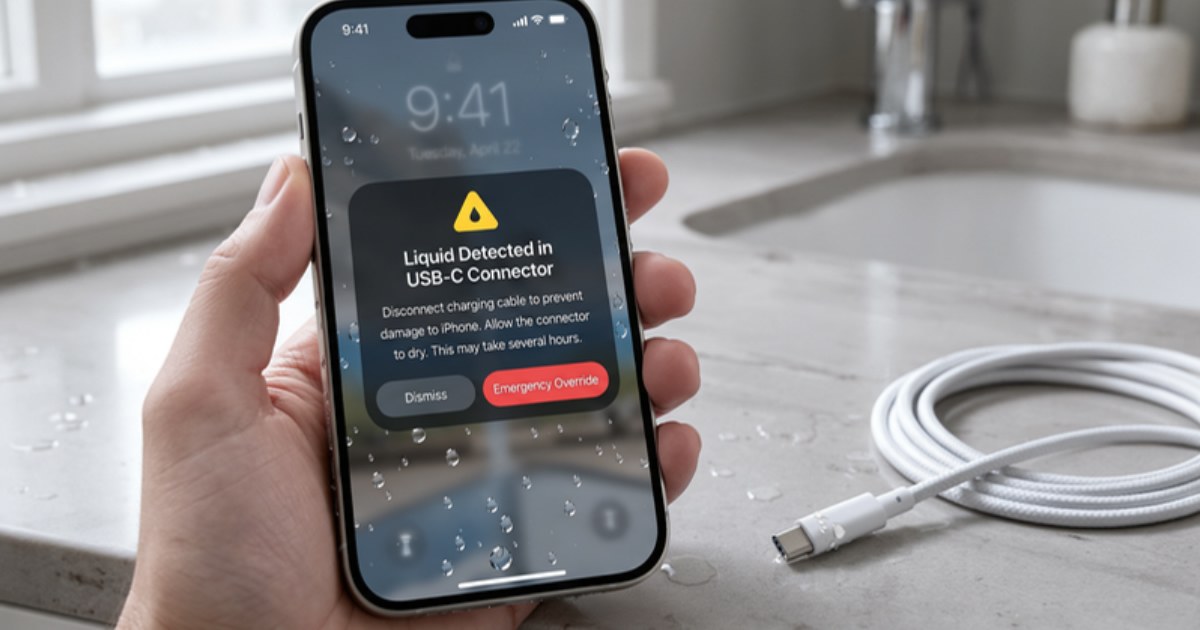
You want to charge your iPhone and get an alert: Liquid Detected. Charging won’t work. That isn’t a fault, but a safety feature. Your iPhone notices there is moisture in the charging port and stops charging to prevent short circuits and rust.
Unplug the cable, gently tap your iPhone against your hand with the port facing down and leave it in a dry place with some airflow. Try again after at least 30 minutes. Drying fully can take up to a day. Don’t put it in rice and don’t use a hairdryer. Wireless charging works in the meantime.
Why your iPhone shows this alert
Every iPhone from the XS and XR onwards checks whether there is moisture in the charging port. If it finds moisture, it blocks charging via the cable. Current and water together attack the contacts. You see the alert after rain, sweat in your trouser pocket, a wet kitchen counter or if your iPhone has fallen into water.
How to let your iPhone dry properly
- Unplug the cableEven if your iPhone asks whether you want to continue.
- Tap the water outHold your iPhone with the port facing down and tap it gently against the palm of your hand.
- Leave it in a dry placePreferably somewhere with a bit of a draught, not in full sun.
- Wait and try againAfter at least 30 minutes. If you get the alert again, wait longer. It can take up to 24 hours.
What you’d better not do
- No rice. Rice doesn’t get the moisture out any faster, and specks of dust can end up in the port.
- No hairdryer or heater. Heat damages the battery and the adhesive.
- No cotton bud or paper in the port. You’d push fluff and moisture further in.
- Don’t keep choosing Emergency Override. Your iPhone sometimes offers to charge anyway. Only do that if you really have to.
The alert keeps coming back
Has your iPhone been dry for a day and do you still see the alert, even with a different cable? Then there is probably rust or dirt in the port, or moisture has got into your iPhone. If you see green or brown deposits on the contacts, have your iPhone checked. If it has really been in water, also read what to do about water damage.
Have your charging port checked
Choose your iPhone and then Charging port. If you’re not sure whether it’s water damage, drop by for a check.
- Open 7 days a week
- Warranty of up to 12 months
- Done while you wait
Frequently asked questions
Can I charge my iPhone wirelessly when I get this alert?
Yes. Wireless charging works as normal, because no current goes through the wet port.
How long does it take for the alert to go away?
Usually within an hour. Sometimes it takes up to a day, depending on how much moisture is in there.
I get the alert even though my iPhone hasn’t been wet. How come?
There may be sweat, condensation or dirt with moisture in the port. A damaged cable can also trigger the alert. Try a different cable.
Is my iPhone no longer water resistant now?
Not necessarily. The alert is only about the charging port. If you notice other problems too, have it checked.
Also read
Daan has been a technician at Fixers for three years and is certified for Apple (Atlas) and Samsung (GSPN). He works at Fixers Leiden and helps write the knowledge base, so that you can often solve a problem yourself first.